
Caja de deseos
La Caja de deseos es una app de lista de deseos gratis para todas las ocasiones que tengas. Marca para quién es la lista (un amigo de Listub o simplemente un nombre escrito), elige un banner acorde con la ocasión, añade artículos con fotos, notas, prioridades y todas las tiendas que quieras, y comparte un único enlace público que los invitados abren en el navegador. Las reservas tienen niveles, así que la sorpresa aguanta: los invitados marcan lo que traen mientras tú ves solo lo que quieres ver.


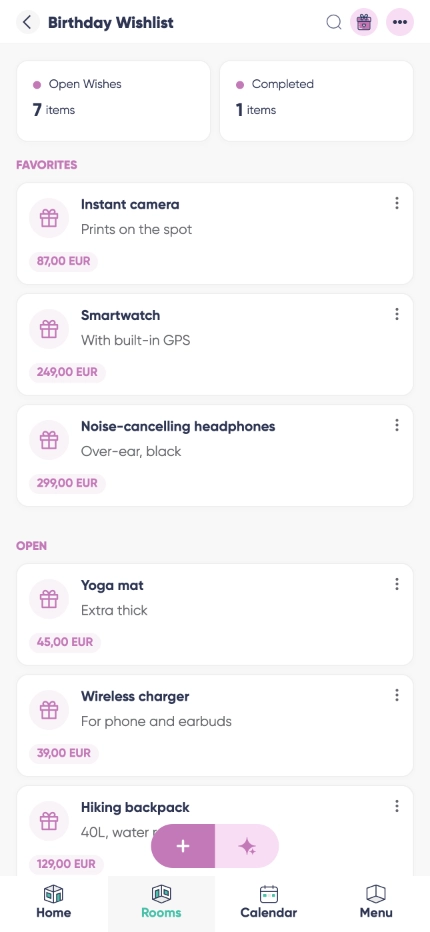

Ocasión, banner y destinatario
Pon la ocasión y su fecha, elige un banner a juego y asigna la lista a la persona a la que va dirigida - un amigo de Listub o un nombre que escribes tú, que es lo que hacen casi todos los padres cuando la lista es de un niño.

Compartir en público sin cuenta
¿Buscabas una app para compartir la lista de deseos con la familia que no va a instalar nada nunca? El enlace se abre en cualquier navegador, y el token sobrevive a dejar de publicar, así que el enlace que enviaste en marzo sigue funcionando en diciembre.

Una lista de deseos para toda la familia, no solo la tuya
Ten una lista por persona en la misma room: imagen, descripción, categoría, prioridad y una entrada de tienda por cada sitio donde se puede comprar, cada una con su precio y su enlace.

Reservas que no destripan la sorpresa

Borradores que se guardan juntos
¿Por qué usar la Caja de deseos?
Una app de lista de regalos tiene un solo trabajo: que nadie compre lo mismo dos veces. La Caja de deseos lo hace con un banner, un destinatario, una fecha de la ocasión y artículos lo bastante detallados como para que nadie tenga que preguntar qué talla o qué color, y luego deja compartir con solo copiar un enlace.
La visibilidad por niveles hace que la misma lista sirva para las dos cosas. Enciende la sorpresa y solo ves que algo está pillado; apágala y ves quién trae qué, que es lo que quieres cuando toda la familia se junta para un regalo grande. Volver a publicar mantiene la misma dirección, así que los enlaces viejos nunca mueren.
Cumpleaños
Una lista de cumpleaños que los tíos y las tías usan de verdad: manda el enlace al grupo de la familia, deja que reserven y mira cómo el mismo jersey deja de llegar por triplicado.
Navidad
Desde noviembre se convierte en la lista de Navidad de toda la casa - una lista por persona y las reservas ocultas por defecto para que nadie deduzca lo que hay bajo el árbol.
Bodas y bebés
Usada como lista de bodas cubre todos los precios a la vez, porque cada artículo puede llevar varias tiendas, y los invitados nunca necesitan cuenta para pedir uno.
Preguntas frecuentes
¿Hay versión para Android?
Sí. Listub funciona en móviles y tablets Android, y tus listas, enlaces y reservas siguen sincronizados con todo lo demás.
¿Hay versión para iPhone?
Sí, en iPhone y iPad, además de la web. Los invitados no necesitan nada de eso: con un navegador les basta para abrir tu enlace.
¿Puedo usarlo para el amigo invisible?
En parte, y este es el límite honesto: Listub no es una app de amigo invisible y no hace el sorteo ni empareja a nadie. Lo que sí hace es guardar la lista de cada uno y ocultar quién reservó qué, así que una vez que vuestro grupo ha sorteado los nombres por otro lado, nadie puede deducir quién le compró qué.
¿Se pueden reservar regalos sin cuenta?
Sí. El enlace público funciona sin registrarse. Cada invitado recibe un identificador aleatorio guardado en su propio navegador, que es lo que permite a ese navegador cambiar después sus propias reservas.
¿Cambia el enlace si dejo de publicar?
No. El token es permanente, así que los enlaces antiguos vuelven a funcionar en cuanto reactivas el compartir.
¿Sigue los precios o compra algo por mí?
No. Listub guarda los deseos y los enlaces de tienda que añadiste tú. No es una tienda y no vigila precios por ti.
¿Cuánto cuesta?
Nada para empezar. Listas, artículos, banners y enlaces públicos están en el plan gratuito, y solo miras Premium cuando quieres invitar a otras personas a tus propias rooms.
¿Puedo compartir mis rooms con familia o amigos?
Compartir tus propias rooms es una función Premium. En el plan gratuito tus rooms son solo tuyas, en tu propio dispositivo, y no puedes invitar a nadie - pero siempre puedes unirte a una room que un miembro Premium comparta contigo y usarla entera.
Añádelo solo con pedirlo
Sin formularios ni menús. Dile a Listub AI lo que quieres y aparece aquí, listo.
Prueba a decir…